About CSUSM
Connect with CSUSM on the go with our official campus mobile app! Keep up to date on your classes, never miss a campus event, enjoy access academic resources, and engage with our vibrant campus life all from your phone....
Connect with CSUSM on the go with our official campus mobile app! Keep up to date on your classes, never miss a campus event, enjoy access academic resources, and engage with our vibrant campus life all from your phone. This application is an ongoing project and we welcome your feedback. Current features include: Personalized experiences Digital ID MyCSUSM Get the most of your CSUSM Experience Find a parking spot and purchase parking permits Dining hours and locations Campus directory Dynamic campus maps Cougar Athletics game schedules and news Campus discounts Campus events Ace Your Classes Cougar Courses Find an open study space or chat with a librarian Check your campus email
Version History Improved performance, bug fixes, and enhancements. 2.8 Mar 24 Bug Fixes & Performance Enhancements 2.7 Jan 15 Bug Fixes and App UI Improvements. 2.6 02/01/2023 Improved performance, bug fixes, and enhancements 2.4 08/22/2020 Updated app to address compatibility issues with iOS 13 1.9 11/19/2019 Improved performance, bug fixes, and enhancements. 1.8 10/03/2019 Corrected blank screen after authentication Closing app no longer signs user out After authentication the homescreen will prompt for refresh to display welcome message 1.7 09/06/2018 This version includes a fix for PeopleSoft usability. 1.6 08/25/2018 Some highlights of the app’s functionality and features include: Personalized Experiences MYCSUSM – Access your MyCSUSM account to add/drop classes, view your class schedule and use Degree Planner. Virtual ID Card – Check in to centers and print faster. Ace Your Classes Cougar Courses – Keep up with your classes. Study/Labs – See which computer labs are currently open and how many stations are available for use. View public printer locations on campus and their status. Email – Never miss a message! Library – Chat with a librarian, search the library, and verify library hours. Get the Most of Your CSUSM Experience Dining Hours and Locations – Know where to grab a bite to eat by viewing the hours, line cameras, and learn about seasonal items. Parking – Purchase a day pass and make changes to your parking account. Campus Map – Find mobile-friendly walking and driving directions to buildings and spaces across campus. Directory – Look up campus members through the directory feature. Athletics – View upcoming games, events, and athletics-based news. News/social – Engage with news, video and social media feeds, access a searchable campus directory, and view featured events. Discounts – Save money on limited time discounts for campus affiliates. csusm app home screen Select push notifications will be sent through the app to users who have opted to turn on their location and allow notifications. We will continue to provide updates on the new features and functionality as they are developed. If you would like to share feedback or thoughts, please email: it-mobile-app-feedback@csusm.edu. 1.5 08/23/2018 The CSUSM mobile app has been updated and redesigned to include the following improvements: · New loading screen · Improvements to speed, stability, and performance · Increased personalization with class schedule visibility and email access · Integrated Virtual ID · Internal improvements allowing for a rich user experience We are constantly striving to make the app better for all users so be on the lookout for improved styles and functionality. 1.4 08/15/2018 Enhancements and bug fixes. 1.3.1 12/02/2017 Enhancements and bug fixes. 1.3 11/30/2017 Enhancements and bug fixes 1.2 06/01/2017 Enhancements and bug fixes 1.1 08/09/2016 1.0 05/23/2016
Previous Versions
Here you can find the changelog of CSUSM since it was posted on our website on 2016-10-04 11:31:37.
The latest version is 2.8 and it was updated on 2026-10-10 11:48:55. See below the changes in each version.
CSUSM version 2.8
Updated At: 2026-10-08
Changes: Version History Improved performance, bug fixes, and enhancements. 2.8 Mar 24 Bug Fixes & Performance Enhancements 2.7 Jan 15 Bug Fixes and App UI Improvements. 2.6 02/01/2023 Improved performance, bug fixes, and enhancements 2.4 08/22/2020 Updated app to address compatibility issues with iOS 13 1.9 11/19/2019 Improved performance, bug fixes, and enhancements. 1.8 10/03/2019 Corrected blank screen after authentication
Closing app no longer signs user out
After authentication the homescreen will prompt for refresh to display welcome message 1.7 09/06/2018 This version includes a fix for PeopleSoft usability. 1.6 08/25/2018 Some highlights of the app’s functionality and features include:
Personalized Experiences
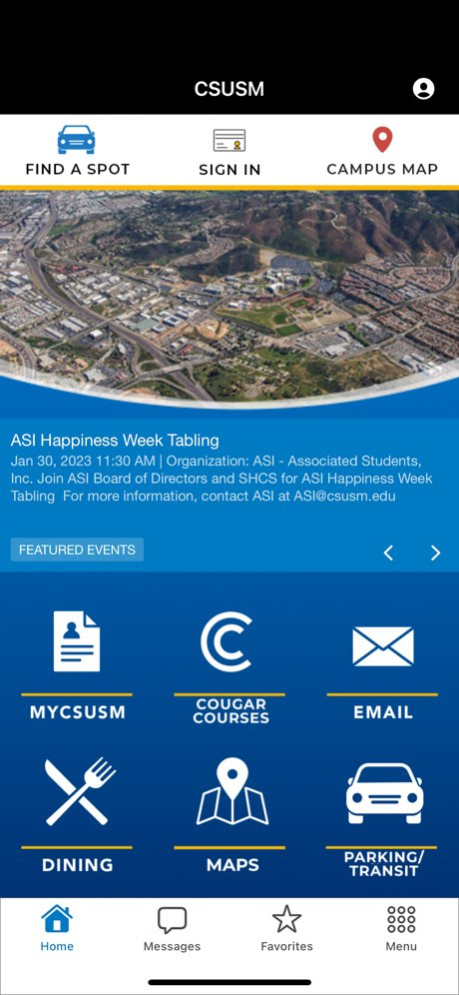
MYCSUSM – Access your MyCSUSM account to add/drop classes, view your class schedule and use Degree Planner.
Virtual ID Card – Check in to centers and print faster.
Ace Your Classes
Cougar Courses – Keep up with your classes.
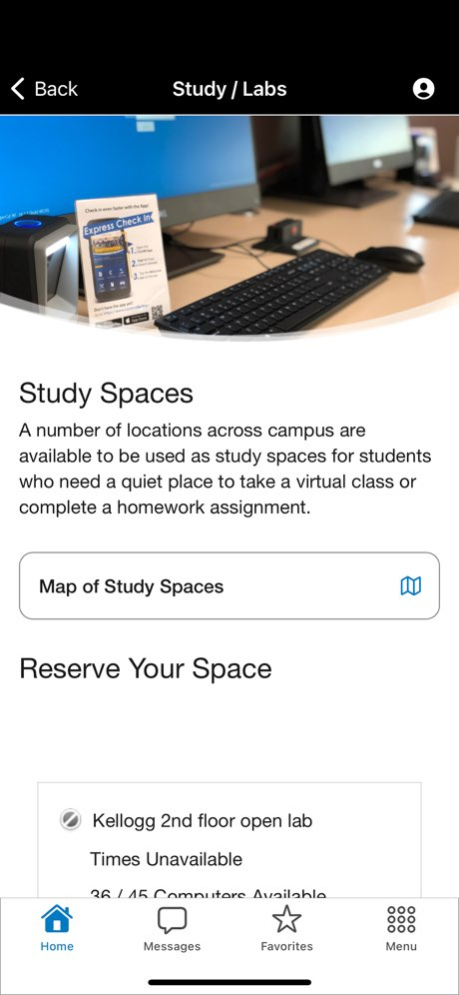
Study/Labs – See which computer labs are currently open and how many stations are available for use. View public printer locations on campus and their status.
Email – Never miss a message!
Library – Chat with a librarian, search the library, and verify library hours.
Get the Most of Your CSUSM Experience
Dining Hours and Locations – Know where to grab a bite to eat by viewing the hours, line cameras, and learn about seasonal items.
Parking – Purchase a day pass and make changes to your parking account.
Campus Map – Find mobile-friendly walking and driving directions to buildings and spaces across campus.
Directory – Look up campus members through the directory feature.
Athletics – View upcoming games, events, and athletics-based news.
News/social – Engage with news, video and social media feeds, access a searchable campus directory, and view featured events.
Discounts – Save money on limited time discounts for campus affiliates.
csusm app home screen
Select push notifications will be sent through the app to users who have opted to turn on their location and allow notifications.
We will continue to provide updates on the new features and functionality as they are developed. If you would like to share feedback or thoughts, please email: it-mobile-app-feedback@csusm.edu. 1.5 08/23/2018 The CSUSM mobile app has been updated and redesigned to include the following improvements:
· New loading screen
· Improvements to speed, stability, and performance
· Increased personalization with class schedule visibility and email access
· Integrated Virtual ID
· Internal improvements allowing for a rich user experience
We are constantly striving to make the app better for all users so be on the lookout for improved styles and functionality. 1.4 08/15/2018 Enhancements and bug fixes. 1.3.1 12/02/2017 Enhancements and bug fixes. 1.3 11/30/2017 Enhancements and bug fixes 1.2 06/01/2017 Enhancements and bug fixes 1.1 08/09/2016 1.0 05/23/2016
CSUSM version 2.7
Updated At: 2026-01-15
Changes: Bug Fixes & Performance Enhancements
CSUSM version 2.6
Updated At: 2023-02-01
Changes: Feb 1, 2023
Version 2.6
Bug Fixes and App UI Improvements.
CSUSM version 1.1
Updated At: 2016-05-23
CSUSM version 2.8
Updated At: 1970-01-01
Changes: Improved performance, bug fixes, and enhancements.
Disclaimer
Official App Store Link
We do not host CSUSM on our servers. We did not scan it for viruses, adware, spyware or other type of malware. This app is hosted by Apple and passed their terms and conditions to be listed there. We recommend caution when installing it.
The App Store link for CSUSM is provided to you by apps112.com without any warranties, representations or guarantees of any kind, so access it at your own risk.
If you have questions regarding this particular app contact the publisher directly. For questions about the functionalities of apps112.com contact us.